Setup your Languages
Input your expert language translations or have automated translations (powered by AI or Google) for your screenshots in over 80 languages.
Using an AI agent? Tell it which languages you need and any words to keep as they are, such as your app name. Your agent adds the languages, runs the project’s automatic translation or applies translations you’ve reviewed, then previews each language so you can check the text fits.
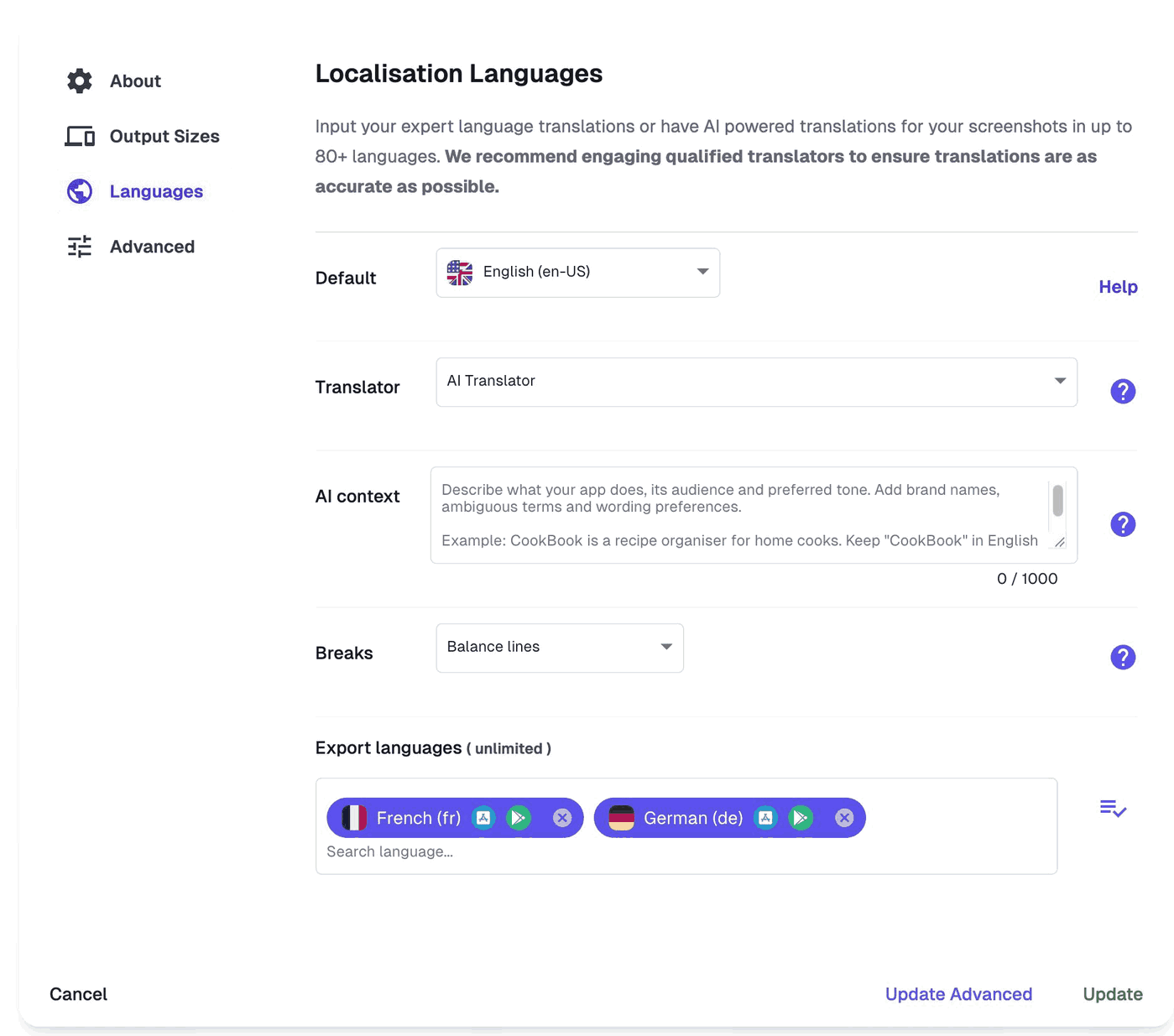
Within your project setup under the Languages section, you'll need to set your default language, translator, add AI context (if using the AI Translator), choose how line breaks are handled and which languages you'd like in your project.
AI context: describe what your app does, its audience and preferred tone, and list brand names or terms to keep as they are. Linked app details and the surrounding screenshot copy are included automatically.
Breaks: Balance lines keeps about the same number of lines but places the breaks where each translation reads well, so captions stay large. Keep source line breaks holds your breaks exactly, for deliberately stacked layouts.
We currently support: Afrikaans, Albanian, Amharic, Arabic, Armenian, Azerbaijani, Bangla, Basque, Belarusian, Bulgarian, Burmese, Catalan, Chinese Simplified, Chinese Traditional, Chinese Traditional HK, Croatian, Czech, Danish, Dutch, English (US), English Australia, English British, English Canadian, English India, English Singapore, English South Africa, Estonian, Filipino, Finnish, French, French Canadian, Galician, Georgian, German, Greek, Gujarati, Hebrew, Hindi, Hungarian, Icelandic, Indonesian, Italian, Japanese, Kannada, Kazakh, Khmer, Korean, Kyrgyz, Lao, Latvian, Lithuanian, Macedonian, Malay, Malayalam, Marathi, Mongolian, Nepali, Norwegian, Odia, Persian, Persian Afghanistan, Persian Iran, Persian United Arab Emirates, Polish, Portuguese, Portuguese Brazil, Punjabi, Romanian, Romansh, Russian, Serbian, Sinhala, Slovak, Slovenian, Spanish, Spanish Latin America, Spanish Mexico, Spanish United States, Swahili, Swedish, Tamil, Telugu, Thai, Turkish, Ukrainian, Urdu, Vietnamese, Zulu.
Arabic, Hebrew, Persian and Urdu are right-to-left languages, and AppScreens lays out their captions right to left.
Within your project, you can upload your localised raw app screenshots for each language, for more help, read here.
For more on localizing your captions, read here.